Bedrock Mod for Minecraft
Mat's Set Home
With Mat's Set Home, you can save important
locations anywhere in your Minecraft world and
quickly teleport back whenever you need to.
Create up to three homes, return to them using
simple commands and manage everything through
an easy in-game menu.
How to use:
/mats:set Set home 1 at your current location.
/mats:set 1 Set or replace home 1.
/mats:set 2 Set or replace home 2.
/mats:set 3 Set or replace home 3.
/mats:home Teleport to home 1.
/mats:home 1 Teleport to home 1.
/mats:home 2 Teleport to home 2.
/mats:home 3 Teleport to home 3.
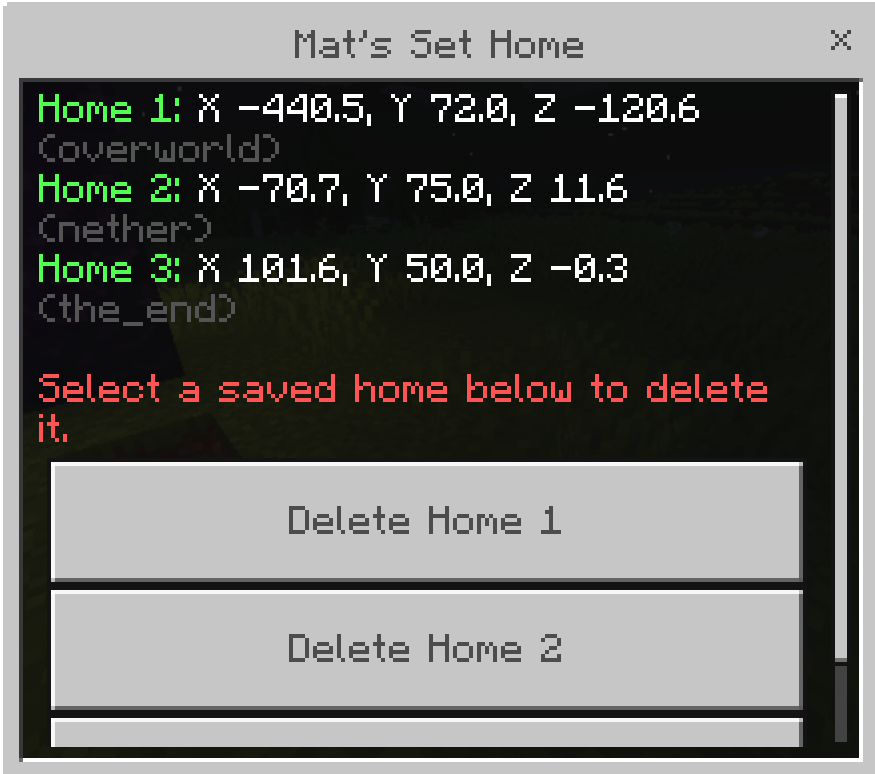
/mats:menu View coordinates and delete saved homes.

How to Install
- Download Mats-Set-Home-Bedrock.mcpack.
- Open the downloaded file with Minecraft Bedrock Edition.
- Wait for Minecraft to confirm that the pack was imported.
- Create a new world or edit an existing one.
- Open Add-Ons → Behavior Packs → My Packs.
- Select Mat’s Set Home Mod for Bedrock.
- Press Activate.
- Start the world.
- Enter /mats:set in chat to create your first home.
Features
Why Choose Mat's Set Home?
Up to Three Homes
Save up to three different locations in your world and move between them with ease.
Simple Commands
Use straightforward commands such as /mats:set 1-3 and /mats:home 1-3.
Management Menu
Open /mats:menu to view, manage or remove all your saved homes.
Exact Location Saving
Each home remembers the exact coordinates where it was created.
Instant Teleportation
Return to your saved locations instantly without long travel times.
Lightweight
Built to be simple, fast and have almost no performance impact.